
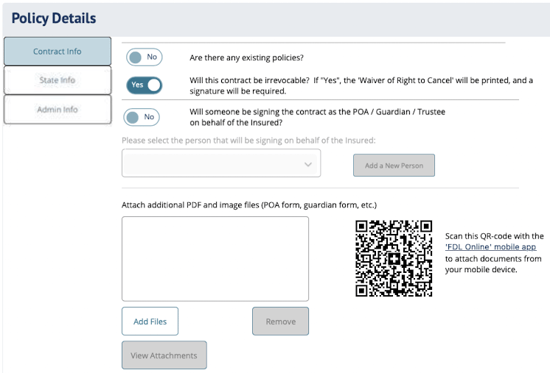
Policy Details fields in DIGicon:
Contract Info
-
Child Rider / Supplement - Toggle Yes or No to indicate whether the Child Rider or Child Supplement is being added to the contract. Not available in every state.
-
Existing policies - Toggle Yes or No to indicate whether there are existing policies. The answer prints on the contract forms for compliance purposes. Answering "Yes" may require listing policy details (varies by state) and a follow-up question "Will there be any policies replaced?", which triggers replacement notice forms.
NOTE: This is not the same as the Existing Policies tab in Payment Options (where you enter the actual policy details and set up 1035-Exchanges). Adding a policy there will automatically default this toggle to "Yes." -
Will the contract be irrevocable? - A Yes/No toggle to set the irrevocability status of the contract. Yes means the insured cannot cancel the contract and reclaim the funds (typically for Medicaid spend-down). No means they retain the right to cancel.
NOTE: This determines whether the Irrevocability form or the Notice of Right to Cancel form is generated in the signature packet -
Will someone be signing the contract as the POA / Guardian / Trustee? - If Yes, a dropdown appears to select from the Family & Friends who were flagged as such. You'll need to include supporting legal documentation. There are a few different ways you can do this:
-
Scan the QR code and upload files using the FDL Mobile app.
-
Drag-and-drop files from your device into the "Attach additional..." box.
-
Click the "Add Files" button and choose individual files on your device.
-
Email documents to incoming.newbusiness@funeraldirectorslife.com.
-
State Info — This tab varies by state and may not appear in DIGicon at all if you do not have state-specific requirements.
-
Goods and Services Statement - List any service that will have a charge associated with obtaining it (e.g., "food for a luncheon," "doves for release"). This information prints on the Goods & Services Statement and may be required by your state.
-
Existing Policies disclosure - Some states require existing policies to be listed here in addition to the Contract Info tab to ensure contract replacement protections.
-
Copy of funeral arrangement - Indicate if any person on the contract should receive a copy of the entire funeral arrangement.
Admin Info
-
Open text field (300-character limit) - A place to explain anything added to the contract as a result of law or a cemetery requirement. (i.e., Outer Burial Containers)
-
Is reason for Embalming "Personal Choice"? - If Yes, no further input is needed. If No, you must choose a specific reason (e.g., as required by law, cemetery requirement, etc.). This prints on the contract forms.
-
Is the contract being signed outside the funeral home? — If Yes, enter the location where the contract is being signed. You don't need the full address; just a general description like "Customer's Home" or "Starbucks." If you're sending for Online Signatures, mark this as "Yes" since the email originates from the funeral home.
-
Will there be items mailed separately for this contract? — Select Yes if you're mailing in supporting documentation (POA forms, legal docs) or payment via cashier's check or money order. This will automatically generate a Mail Transmittal form to include with the mailed items. If everything is being submitted electronically or emailed, select No.
Explore other DIGicon sections:
- Contract Setup
- Lead Details
- Insured Information
- Address & Contact
- Health Information
- Goods & Services
- Payment Options
- Family & Friends
- Veteran Information
- Legal Parties
- Personal History
- Funeral Options
- Verification and Signature Collection
If you have any questions or concerns, please contact the Help Center at (800) 692-5125 or email help@funeraldirectorslife.com.