
Veteran Information can be included in the Vital Statistics, Thoughtful Decisions Guide, and Memorial Guide (where applicable).
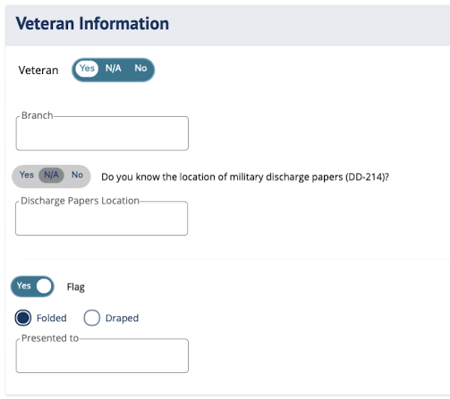
Veteran Information fields in DIGicon:
-
Veteran (Yes / N/A / No) - Toggle to indicate whether the insured served in the military (enabling the veteran-related fields below).
-
Branch - Provide the specific military branch the insured served in (e.g., Army, Navy, Air Force, Marines, Coast Guard, etc.).
-
Does the insured know where their DD-214 (discharge paperwork) is?
-
Yes / N/A / No - Choose whether the insured knows where the paperwork is.
-
Discharge Papers Location - If Yes was selected, use this field to indicate where the papers are physically located (e.g., safe deposit box, filing cabinet at home, VA office, etc.).
-
-
Flag (Yes / No) - Indicate whether a U.S. burial flag will be included in the funeral service. Selecting Yes enables the fields below
-
Folded / Draped - Indicate how the flag should be presented.
-
Folded = Flag will be in a traditional tri-fold.
-
Draped = Flag will be laid over the casket.
-
-
Presented To - Enter the name of the person who will receive the flag after the service (typically next of kin).
-
Explore other DIGicon sections:
- Contract Setup
- Lead Details
- Insured Information
- Address & Contact
- Health Information
- Goods & Services
- Payment Options
- Family & Friends
- Policy Details
- Legal Parties
- Personal History
- Funeral Options
- Verification and Signature Collection
If you have any questions or concerns, please contact the Help Center at (800) 692-5125 or email help@funeraldirectorslife.com.