
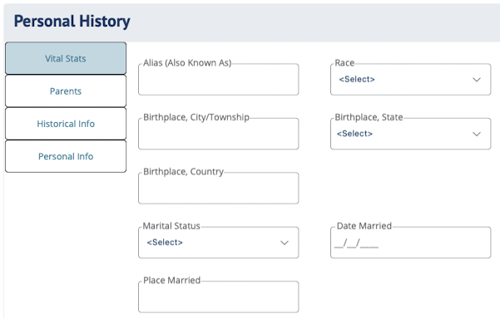
Personal History fields in DIGicon:
Vital Stats
-
Alias (Also Known As) - Any other name the insured goes by or has been known by.
-
Race - Select the insured's race (e.g., African American, American Indian, Asian, Cuban, etc.). This is required for the death certificate.
-
Birthplace, City/Township - The city or township where the insured was born.
-
Birthplace, State - The state where the insured was born.
-
Birthplace, Country - The country where the insured was born.
-
County of Residence - The county where the insured currently resides.
-
Marital Status - Select the insured's marital status (e.g., Single, Married, etc.). If a "Spouse" is added in the Family & Friends (People) tab, this will automatically be set to "Married." If that spouse is marked as "Deceased," it will be set to "Widowed."
-
Date Married - The date the insured was married, if applicable.
-
Place Married - The location where the marriage took place.
-
Education Level Completed - Select the insured's highest level of education (e.g., High School, Bachelor's, etc.).
-
Occupation - The insured's occupation or job title.
-
Type of Business - The industry or type of business the insured works or worked in.
-
Employer - The name of the insured's employer
Parents
-
Father
-
First Name / Middle Name / Last Name - The insured's father's name.
-
Birthplace - The father's place of birth.
-
Deceased checkbox - Check this if the father is deceased.
-
Edit more details - A link that navigates to the father's full profile in Family & Friends for editing additional details.
-
-
Mother
-
First Name / Middle Name / Last Name - The insured's mother's name.
-
Maiden Name - The mother's maiden name (last name before marriage).
-
Birthplace - The mother's place of birth.
-
Deceased checkbox - Check this if the mother is deceased.
-
Edit more details - A link that navigates to the mother's full profile in Family & Friends for editing additional details.
-
Historical Info
-
In Community Since - Indicate how long the insured has been part of their community (8 characters max).
-
Community Involvement - A free-text area (500 characters max) to list organizations, clubs, or community groups the insured is part of.
-
Church - Enter the name of the insured's church or place of worship.
-
Church City - Enter the city where the church is located.
-
Church State - Select the state where the church is located.
-
Hobbies, Interests, Passions - A free-text area (500 characters max) for listing the insured's hobbies and personal interests.
-
Years Employed - Enter the number of years the insured has been employed.
-
Employed Since (Year) - Provide the year the insured started their current or most recent employment.
-
Employment City - The city where the insured works or worked.
-
Employment State - The state where the insured works or worked.
-
Additional Information - A free-text area for any other relevant details about the insured's life in the community.
Personal Info — Each field follows the same format: Yes / N/A / No, followed by a Location(s) field to provide more detail.
-
Will and/or Trusts
-
Healthcare Directives
-
Power of Attorney
-
Usernames/Passwords
-
Life Insurance Policies
-
Do you have Bank Accounts?
-
Are beneficiaries up to date? - If Beneficiaries are not up to date, family members may have difficulty receiving life insurance proceeds.
-
Funeral Arrangement Documents
-
Safe Deposit Box
Explore other DIGicon sections:
- Contract Setup
- Lead Details
- Insured Information
- Address & Contact
- Health Information
- Goods & Services
- Payment Options
- Family & Friends
- Veteran Information
- Policy Details
- Legal Parties
- Funeral Options
- Verification and Signature Collection
If you have any questions or concerns, please contact the Help Center at (800) 692-5125 or email help@funeraldirectorslife.com.