
Skip to:
What are permissions? Permissions control what each user can see and do inside Online Access. As an admin, you can:
-
View a list of all users at your location
-
Search for a specific user by name or username
-
Edit which features and functions each user can access
Any changes you make are automatically recorded, and the affected user will receive an email summarizing the changes.
Steps to manage permissions
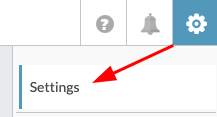
Click the gear icon ⚙️ in the top-right corner.
Click Settings.
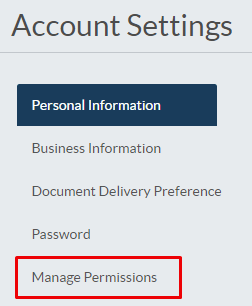
Under Account Settings, click Manage Permissions.
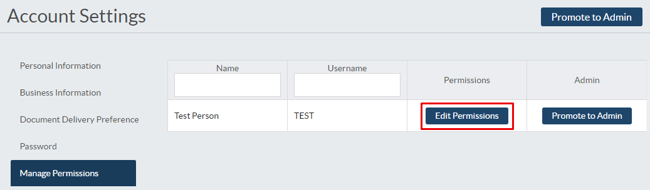
You'll see a grid of all users you can manage.
Use the search bar to find a specific person by name or username.
Click Edit Permissions next to the user you want to update.
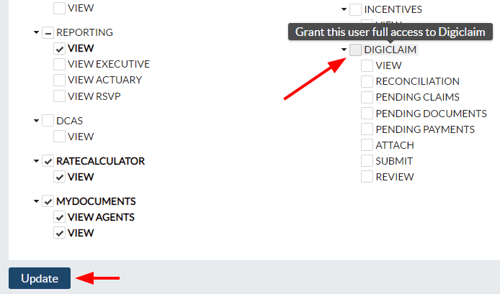
Check or uncheck the functions you want the user to have access to.
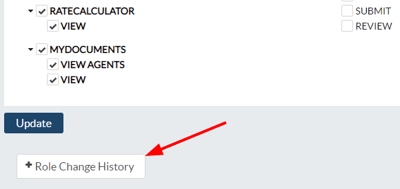
Click Update to save your changes.
All permission updates are recorded in the Role Change History section on the user's permissions page.
Common permissions to check
Depending on your user's role, you may want to enable or disable access to areas like:
-
Reporting — view and generate reports
-
DIGicon — access to preneed writing software, DIGicon
-
Campaign Management — manage marketing campaigns
-
Claimcheck — submit and manage insurance assignments
-
Role Funeral Home — core funeral home access (should be checked for all FH users)
The specific permissions available may vary based on your organization's setup and the services you use.
If you have any questions or concerns, please contact the Help Center at (800) 692-5125 or email help@funeraldirectorslife.com.