
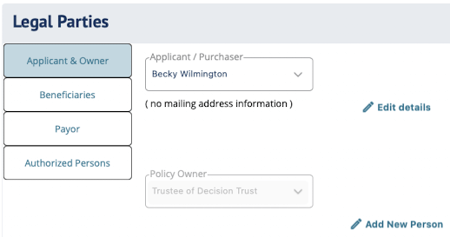
Legal Parties fields in DIGicon:
Applicant & Owner
-
Applicant/Purchaser - The person purchasing the contract. This is typically the insured, but can be someone else (e.g., a son or daughter buying on behalf of a parent). Only people added in the Family & Friends (People) tab will appear.
-
Policy Owner - Who owns the policy. This can be the same person as the Applicant/Purchaser, or someone different (e.g., a family member or, in some states, the Funeral Home). The Policy Owner will receive all correspondence (the policy itself, acceptance letters, lapse notifications, etc.) at their mailing address.
NOTE: In Texas, this is always locked to Trustee of Decisions Trust. For BSI (Burial Space Insurance) contracts, the owner must be the spouse or an immediate family member, depending on the state. -
Policy Contingent Owner - Backup owner if the primary Policy Owner passes away or can no longer own the policy. Selecting a Contingent Owner generates the Election of Contingent Owner form (Form 6042).
NOTE: This field only appears in certain states.
Beneficiaries
-
Primary Beneficiary - Receives the policy funds at the time of need. Options include people from the Family & Friends tab, "Estate of [Insured's Name]," or the Funeral Home. Options vary by state compliance rules.
-
Contingent Beneficiary - Receives any remaining funds after at-need expenses are paid, or if the Primary Beneficiary is unable to receive them.
-
Same as Purchaser checkbox - When the Primary Beneficiary is the same person as the Applicant/Purchaser, this box should be checked on the form. This will appear on the printed contract form (Form 6134).
Payor
-
Payor - The person responsible for paying the premiums on the contract. This may or may not be the same as the Applicant/Purchaser or the Policy Owner. The Payor's address is pulled from what was entered in the Family & Friends (People) tab.
NOTE: In Texas, this is always locked to "Funeral Agency, Inc." In some states, the Payor must match the Policy Owner and cannot be edited. If the field is grayed out, it means your state requires the pre-listed value.
Authorized Persons
-
Primary Contact / Secondary Lapse Notification - A person to receive a secondary lapse notification if the policy is at risk of lapsing. This is required in some states. If a person is selected, their address will be required.
-
Secondary Contact - An additional authorized person who can make decisions on behalf of the insured at the time of need. This field is optional in most states and appears alongside the Primary Contact. Both Primary and Secondary contacts are people authorized to act on the contract.
Explore other DIGicon sections:
- Contract Setup
- Lead Details
- Insured Information
- Address & Contact
- Health Information
- Goods & Services
- Payment Options
- Family & Friends
- Veteran Information
- Policy Details
- Personal History
- Funeral Options
- Verification and Signature Collection
If you have any questions or concerns, please contact the Help Center at (800) 692-5125 or email help@funeraldirectorslife.com.