
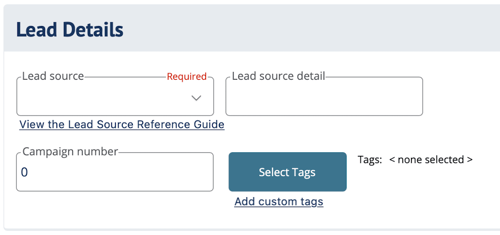
Lead Details fields in DIGicon:
-
Lead source [required] - Use the drop-down menu to select how the lead was generated. If you need help determining the best-suited lead source, click View the Lead Source Reference Guide under the Lead Source field.
-
Lead source detail - Provide the location or additional information about the source of the lead. (e.g., If the Lead source was a Lunch & Learn, you can provide the specific restaurant here)
-
Campaign number - Use this field to indication the campaign number or other information about a specific campaign. (e.g., For a mailer campaign, you might list the date and/or name of the campaign)
-
Select Tags / Add custom tags - Tags are optional, but can help you organize and filter contracts on your dashboard.
-
If you are new to tags, select Add custom tags and setup any tags you like.
-
Click/tap the Select Tags button to assign tags to the current contract.
-
Explore other DIGicon sections:
- Contract Setup
- Insured Information
- Address and Contact
- Health Information
- Goods and Services
- Payment Options
- Family and Friends
- Veteran Information
- Policy Details
- Legal Parties
- Personal History
- Funeral Options
- Verification and Signature Collection
If you have any questions or concerns, please contact the Help Center at (800) 692-5125 or email help@funeraldirectorslife.com.