
Family & Friends can be included in the Vital Statistics, Thoughtful Decisions Guide, and Memorial Guide (where applicable).
Add anyone associated with the contract or whose information will be referenced in the contract (i.e., family member, Power of Attorney, trustee, guardian, etc.).
To begin adding family and friends, first click the add person icon  .
.
Next, click Edit Details to provide details.
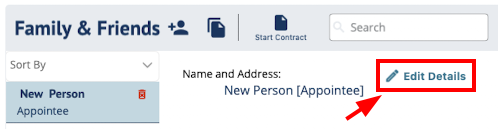
A window will appear to edit/add the person's information.
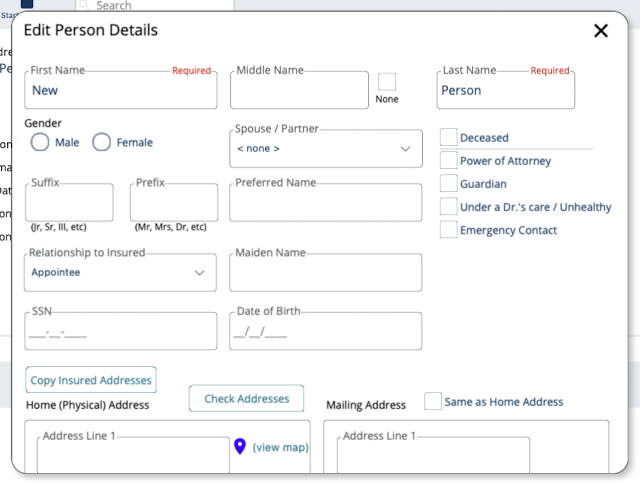
Family & Friends fields in DIGicon:
-
First Name and Last Name are the only required fields.
-
Middle Name - Check the None checkbox if the person doesn't have one.
-
Prefix - A title before the name (e.g., Mr., Mrs., Dr.).
-
Suffix - A designation after the name (e.g., Jr., Sr., III).
-
Preferred Name - A nickname or name the person goes by (if different).
-
Relationship to Insured - A dropdown to define how this person is related to the insured (e.g., Spouse, Son, Daughter, Friend, POA, Guardian, etc.).
Selecting "Spouse" will auto-fill the insured's name in the Spouse/Partner field.
Relationships marked with an asterisk (e.g., Appointee, Guardian, Power of Attorney, Trustee) require legal documentation to process. -
Deceased checkbox - Marks the person as deceased, which grays out contact-related fields (email, city, state, phone, phone type) since they are no longer reachable.
-
Power of Attorney checkbox - Check this if the person holds POA and will be signing on behalf of the insured.
This makes them available in the Legal Parties dropdown.
Cannot be selected at the same time as Guardian. -
Guardian checkbox - Check this if the person is the insured's legal guardian and is signing on their behalf.
Cannot be selected at the same time as Power of Attorney (POA). -
Under a Doctor's Care / Unhealthy checkbox - Indicates the person is currently under medical care or in poor health.
Used for the Child Rider and Supplement to indicate children that are not covered (for states that have those services). -
Emergency Contact checkbox - Flags this person as an emergency contact for the insured.
-
Gender - Choose either Male or Female.
-
Date of Birth - The person's date of birth.
-
SSN - The person's Social Security Number. Not required, but helpful if they are a payor, owner, or otherwise financially tied to the contract.
-
Maiden Name - The person's maiden name, if applicable.
-
Spouse/Partner - Auto-populated with the insured's name when "Spouse" is selected as the relationship.
-
Birthplace - The person's place of birth.
The field is added when Mother or Father is selected as the relationship. -
Email - The person's email address.
-
Primary Phone - The person's main phone number.
-
Phone Type - Classifies the primary phone (e.g., Home, Cell, Work).
-
Secondary Phone - An alternate phone number for the person.
-
Home Address - The person's residential street address, city, state, and zip code.
-
Copy Insured Addresses button - Copies the insured's address information into this person's address fields. Use if the person lives with the insured.
-
Mailing Address - Where physical mail should be sent for this person.
-
Same as Home Address checkbox - When checked, auto-fills the mailing address with the home address so you don't have to enter it twice.
- Check Address button - Verifies the entered address against postal records. If the address is not valid, it returns a suggested corrected address (e.g., fixing a zip code or standardizing the street format).
Explore other DIGicon sections:
- Contract Setup
- Lead Details
- Insured Information
- Address & Contact
- Health Information
- Goods & Services
- Payment Options
- Veteran Information
- Policy Details
- Legal Parties
- Personal History
- Funeral Options
- Verification and Signature Collection
If you have any questions or concerns, please contact the Help Center at (800) 692-5125 or email help@funeraldirectorslife.com.