
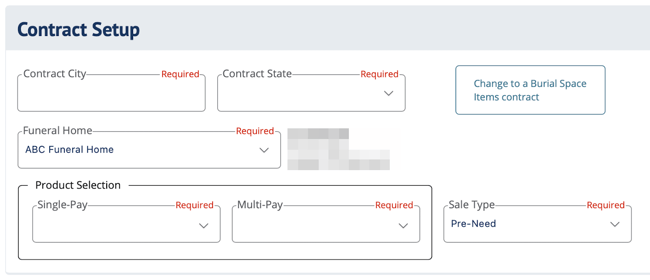
Contract Setup fields in DIGicon:
-
Contract City - The city where you are physically writing the contract.
-
Contract State - This drop-down menu includes each state in which you are authorized or licensed to write preneed. After selecting a state, the funeral homes in that state will appear in the Funeral Home drop-down.
-
Funeral Home - Includes all funeral homes that your agent profile is associated with. Select the funeral home you're actively writing for.
-
Product Selection - A list of product codes set by your funeral home. They determine the premium calculations and payment plan options available.
NOTE: These are preset and agreed upon by the funeral home. -
Sales Type - Select the type of contract you're writing (typically Pre-need). If you have questions about Insurance Only, reach out to your manager or funeral director.
-
Change to Burial Space Items contract (button) - Use this when the contract is ONLY for burial space items (e.g., Medicaid spend-down contract that does not include other funeral goods or services).
NOTE: This is a state-specific option that may not appear for all users.
In Kentucky, there are two BSI buttons. Choose the option that matches who the contract is for:
-
BSI (Burial Space Items) – for the Medicaid applicant or spouse.
-
Burial Space Contract (BS) – for immediate family members of the Medicaid applicant.
Explore other DIGicon sections:
- Lead Details
- Insured Information
- Address and Contact
- Health Information
- Goods and Services
- Payment Options
- Family and Friends
- Veteran Information
- Policy Details
- Legal Parties
- Personal History
- Funeral Options
- Verification and Signature Collection
If you have any questions or concerns, please contact the Help Center at (800) 692-5125 or email help@funeraldirectorslife.com.