
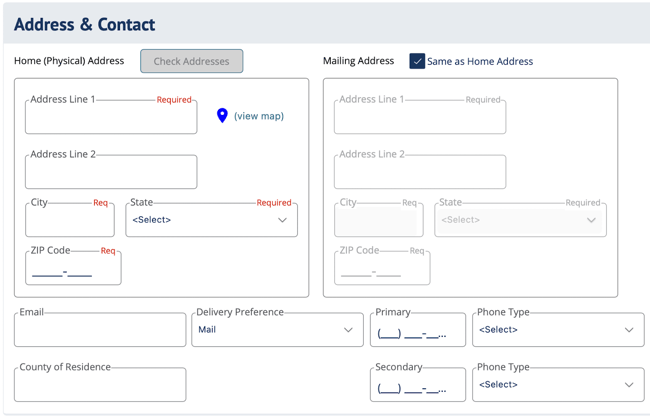
Address & Contact fields in DIGicon:
-
Address Line 1 - Add the street address for the insured in this field.
-
Address Line 2 [not required] - Can be used for an apartment number or other specific identifier for the home address.
-
City - Add the city where the insured lives.
-
State - Add the state where the insured lives.
-
Zip Code - Add the insured's mailing zip code.
-
Mailing Address - Use the checkbox if the mailing address is the same as the physical address. Otherwise, provide a separate address that can receive mail.
-
Email - Provide the applicant's preferred email address for communication.
-
Delivery Preference - Use the drop-down menu to set the applicant's preferred delivery method for documents, such as Policy Packet, paid in Full Certificates, etc.
-
Country of Residence - Add the country in which the insured currently lives.
-
Primary - Add a primary phone number for the insured, then select a Phone Type from the drop-down menu.
-
Secondary - Add a secondary phone number for the insured, then select a Phone Type from the drop-down menu.
Explore other DIGicon sections:
- Contract Setup
- Lead Details
- Insured Information
- Health Information
- Goods and Services
- Payment Options
- Family and Friends
- Veteran Information
- Policy Details
- Legal Parties
- Personal History
- Funeral Options
- Verification and Signature Collection
If you have any questions or concerns, please contact the Help Center at (800) 692-5125 or email help@funeraldirectorslife.com.